The first time Claude Code stops with a usage message, it usually happens at the worst moment: halfway through a refactor, with the agent holding a plan in its context that you now have to wait for. The second time, you start wondering how the limit actually works, how close you are and whether there is a way to see it coming.
This guide explains the shape of Claude Code usage limits without pretending to know exact numbers. Anthropic sets the quotas per plan and has changed them before, so any article that quotes a precise figure is a snapshot. What stays stable is the model: windows, resets and the habits that keep you out of trouble.
How the usage windows work
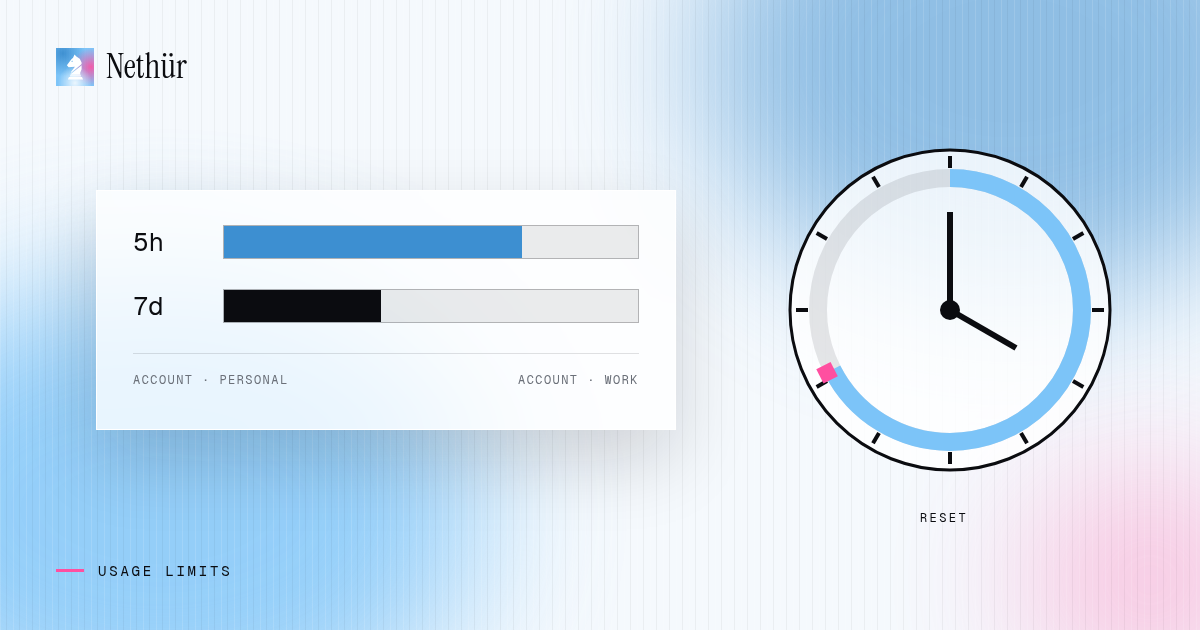
When you use Claude Code with a Claude subscription, usage counts against windows rather than a monthly bucket. There are two you will meet in practice:
- A five-hour window. It starts with your first request and resets roughly five hours later. It governs bursts: a heavy morning session can fill it even when your week is fine.
- A weekly window. It caps total usage over a longer period. You can have five-hour headroom and still be stopped because the week is spent.
- Model-specific weekly limits. Some plans have a separate weekly allowance for the largest models, so switching models can change which window you are spending.
How much fits in each window depends on your plan, the models you use and how long your context is. Long sessions with big files in context cost more per message than short, focused ones. Anthropic’s own pages are the source of truth for the current numbers; treat anything else, including this article, as a description of the shape.
Why agent workflows hit limits faster
Chat use and agent use are different workloads. An agent reads files, runs commands, reads the output and tries again, all inside one prompt from you. Several things multiply that:
- Parallel sessions. Three agents in three worktrees spend one account three times as fast.
- Long contexts. A session that has been running all morning carries its history into every turn until it is compacted.
- Subagents. Delegated work still counts against the same account.
- Retry loops. An agent stuck on a failing test can burn a window without making progress.
None of this means you should stop running agents in parallel. It means usage is now an operational concern, like disk space or CI minutes, and deserves a dashboard. The parallel agents guide covers when parallelism is worth the extra spend.
Tracking usage without guessing
Claude Code itself can tell you about your current usage and limits from inside a session. That works well for one session. It works less well when you have several sessions, several worktrees or several accounts, because the information lives inside each terminal and its own status view is only a single-session snapshot.
Nethür takes a different route: it reads the local usage state each agent keeps on disk — under ~/.claude for Claude Code and ~/.codex for Codex, plus the equivalents for Gemini CLI, OpenCode and others — and shows it in the status bar. There are no extra API calls and no extra auth. The usage popover lists every tracked provider with its plan, per-window bars and the soonest reset, sorted so the tightest limit is first, and a warning chip appears once you cross 80% of a window.
Because it reads what the agent writes, the readout is only as fresh as the agent’s own bookkeeping. It updates when the agent records usage, not on every keystroke. The usage tracking docs list exactly which windows and providers are shown.
Planning around resets
Once you can see the windows, you can plan with them. The five-hour window is the one you can shape, because it starts when you first use it. If your first request of the day happens at 11:00, your window resets mid-afternoon — right when you might want to start the heaviest work.
- Usage warming. You pick the hours, and Nethür sends one tiny request on the cheapest model to start each Claude and Codex account’s five-hour window early, so it resets when you actually need it.
- Stop thresholds. Set a five-hour and a weekly percentage. When the account a chat runs on crosses it, Nethür pauses that chat, leaving headroom for work you care about more.
- Resume at reset. When a limit is hit, a chat can resume by itself at the earliest reset instead of waiting for you to notice.
Multiple accounts and providers
Many developers have more than one subscription: a personal Claude plan and a work one, or a Claude plan and a Codex plan. Switching between them by logging out and in is slow and breaks running sessions. Nethür keeps each account separate and swaps the active one in one click; new sessions use the new account, and sessions already running keep the account they started with until restarted. The flow is described in hot-swapping accounts and applies to Claude Code too.
You can also put subscriptions in priority order. When one provider’s accounts hit their limits, a chat hands over to the next provider with the whole conversation. If everything is out, it resumes by itself at the earliest reset. Use accounts you are entitled to use — your own personal and work plans — and follow each provider’s terms.
Ways to manage limits, compared
| Approach | Visibility | Before the limit | At the limit |
|---|---|---|---|
| Wait for the message | None until it stops | Nothing | Wait for the reset, then rebuild context |
| Check inside each session | One session at a time | Manual checks | Switch accounts by logging out and in |
| Status line or tracker script | One account, one machine | A number on screen | Still manual |
| Nethür | Every tracked provider and account in one popover | Warning chip, stop thresholds, window warming | Account hot-swap, provider failover, resume at reset |
Pitfalls to avoid
- Trusting old numbers. Plan limits change. Check your current plan instead of a forum post from last quarter.
- Ignoring the weekly window. A fresh five-hour window does not help if the week is spent. Watch both.
- Letting stuck agents run. An agent looping on the same failure burns usage for nothing. Stop it, read the error and give it a better prompt.
- Never compacting. Long sessions cost more per turn. Start a fresh session or compact when the task changes.
- Treating cost estimates as bills. Any cost figure from local state is an estimate. The provider console is authoritative.
A note for teams
On a team, limits should belong to people, not to a shared key. In Nethür each teammate signs in with their own subscription, so usage, limits and failover are per account and one person’s heavy day does not stop anyone else. Nethür does not resell model access; it shows you what your own accounts are doing. When someone takes over a teammate’s session, the session keeps its provider and account, so it is clear whose usage it spends. The team guide explains the rest.
A simple routine
Check your usage before you start a heavy task, not after. Run two agents rather than five until you know how fast your work spends a window. Warm the window before your most productive hours, set a stop threshold that leaves room for urgent work, and keep a second account or provider ready for the days the first one runs out. Limits stop being a surprise once you can see them.