Claude Code runs where you start it. On a laptop, that means the agent stops when the lid closes, competes with your editor for memory and only exists on one machine. Moving it to a server changes all three: the agent keeps working while you commute, the heavy builds run on hardware you chose, and you can check in from whatever device is in front of you.
The catch is that “run Claude Code on a server” hides several decisions. Which machine owns the repository? How do you reach it? What happens when the connection drops halfway through a long task? And who else can reach that machine once it is online? This guide walks through those decisions in order.
Why run Claude Code on a server at all
- Long tasks survive. A refactor, a test-suite fix or a dependency upgrade can run for a long time. On a server it does not care whether your laptop is awake.
- One place for the work. The repository, worktrees, terminals and agent sessions live on one host instead of being scattered across laptops.
- Better hardware. Large monorepos, slow builds and GPU work run on a machine sized for them.
- Any client. A browser, a desktop app or a phone can show the same sessions, because the client only displays what the server is doing.
The principle to keep in mind: the execution host owns the work. Whatever machine runs the agent also holds the files, the git state and the processes. Clients come and go; the host does not. That is also why the host does not have to be rented — the Nethür desktop app can itself be the host on a machine you leave running, such as a spare desktop or home server.
Server prerequisites
Any Linux VPS or always-on machine you control will do. Size it for your builds rather than for the agent: Claude Code itself is light, but your test suite, language servers and dev servers are not. On the server you need git, the agent CLIs, your project’s toolchain and a way in.
# Debian / Ubuntu
sudo apt-get update
sudo apt-get install -y git build-essential python3

# install a current Node.js first, then the agent CLIs
npm i -g @anthropic-ai/claude-code
npm i -g @openai/codex

# log in once, on the server, from a terminal
The build tools matter more than they look. When Nethür connects to a host over SSH it installs a small relay there, and remote terminals need a native module that is often compiled on Linux hosts. Without make, a C++ compiler and python3, files, git and the editor still work, but remote terminals do not until you install them.
Where the repository should live
Clone the repository on the server, not on your laptop. Agents edit files, run tests and create worktrees next to the code, so the code has to be on the execution host. Give the server its own deploy key or a scoped token for pushes, rather than copying your personal SSH key onto a shared machine.
mkdir -p ~/code && cd ~/code
git clone [email protected]:acme/web.git
cd web && git worktree list
Two ways to connect: SSH target or a self-hosted server
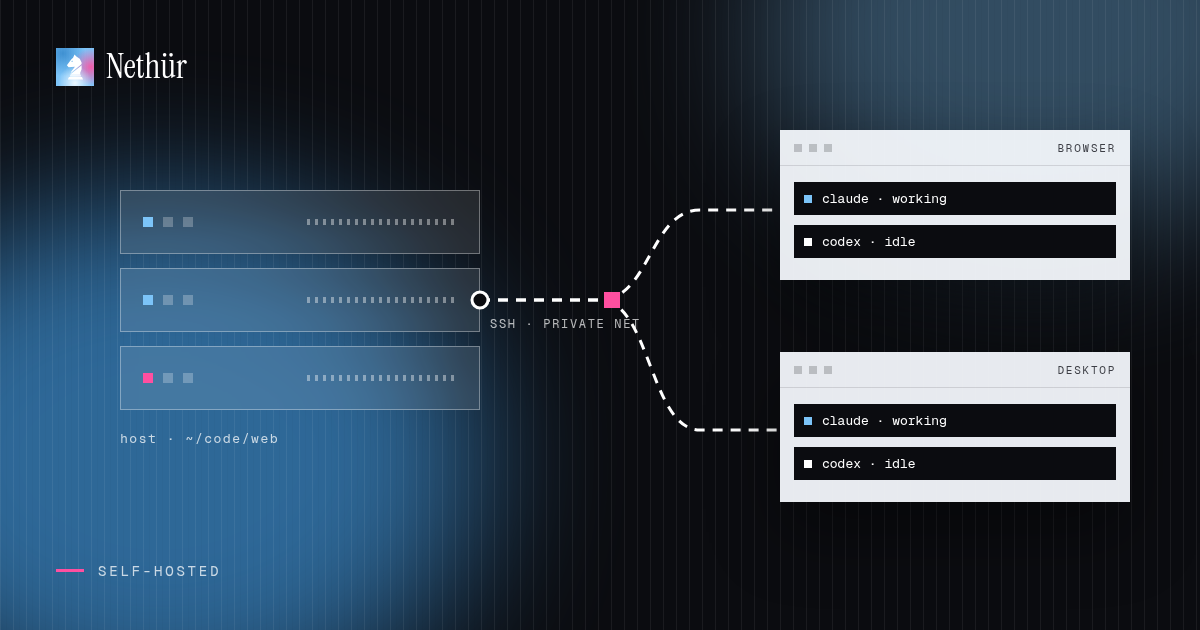
There are two reasonable shapes. In the first, your Nethür desktop app or team server stays where it is and uses the VPS only to run selected workspaces over SSH. In the second, the VPS runs the whole Nethür server and every client connects to it.
Option 1: add the VPS as an SSH target
- Make sure you can already reach the host with plain
sshusing a key. - In Nethür, open Settings → SSH and add a target. You can pick a host straight from
~/.ssh/config, including jump hosts and proxies. - Test the connection, then add the repository with the SSH target as its location — or open any remote folder as a folder workspace.
- Create a worktree. Nethür runs
git worktree addon the remote, and agents you launch run there, not on your laptop. - Use the Ports tab to forward a dev server running on the VPS to your machine.
This is the best fit when the VPS is a build box with the right toolchain and you want the rest of your setup unchanged. The SSH workspaces guide covers host keys, passphrases, jump hosts and port forwarding, and the remote worktrees recipe is the short version.
Option 2: run a Nethür server on the VPS
When the server should own everything — projects, workspaces, agent sessions, provider accounts and team chat — run the Nethür runtime on it headless and connect from your clients. Install the Linux package from the downloads page, join the server to a private network such as Tailscale, then start it with the address clients should dial.
# private network first
curl -fsSL https://tailscale.com/install.sh | sh
sudo tailscale up
tailscale ip -4   # e.g. 100.64.1.20

# register agent accounts from the server shell
nethur-ide account add --agent claude

# start the server (the Linux CLI is nethur-ide)
nethur-ide serve --pairing-address 100.64.1.20
The command prints a pairing URL. Paste it into Settings → Remote Nethür Servers → Add Server on your desktop app, and the server’s projects appear in your sidebar; teammates open the same server from the browser. Each paired client gets its own revocable access grant. Details, including a fixed port and service setup, are in Remote Nethür servers.
| Setup | Who owns the work | Reach it from | Good fit |
|---|---|---|---|
| `ssh` + `tmux` by hand | The VPS, one shell at a time | A terminal with your key | One person, one agent, comfortable in tmux |
| Nethür with an SSH target | The VPS runs selected workspaces | Your Nethür desktop app or team server | Build boxes, GPU hosts, existing infrastructure |
| Self-hosted Nethür server on the VPS | The VPS runs the whole workspace | Browser, desktop app and phone | Teams, always-on agents, switching devices |
| Desktop app as the host | A machine you leave running | Browser and other desktop clients | Solo work or a small team without a rented server |
What happens when the connection drops
A disconnect should be boring. With an SSH target, remote terminal sessions are held by the relay on the host, so closing the app or losing Wi-Fi does not kill the agent. When you reconnect, Nethür re-attaches the terminals with their scrollback. With a self-hosted server, the client is only a view: the agents keep running on the server whether the tab is open or not.
One rule worth internalizing: losing contact with a host is not evidence that its work stopped. If you cannot reach the server, do not start a second agent on the same worktree from somewhere else. Reconnect first and check what is still running.
Security checklist
- Do not expose the Nethür port to the public internet. Use Tailscale, WireGuard, a trusted LAN, SSH forwarding or an authenticated tunnel.
- Treat pairing links like passwords. Revoke a client’s grant under Shared Server Access if a link went to the wrong person.
- Use key-based SSH, keep host key checking on and verify a fingerprint before accepting a changed key.
- Remember that a worktree is not a sandbox. An agent with permission prompts off can reach whatever its user account can reach on the server. Run agents as a dedicated user and keep production credentials off the box.
- On a busy Linux host, cap per-terminal memory with
NETHUR_TERMINAL_MEMORY_MAXso one runaway job cannot take the whole server down.
What it costs
There are three separate bills, and only one of them is Nethür. The VPS is whatever your hosting provider charges for the size you pick. Model usage stays on your own Claude or Codex subscriptions; Nethür does not resell model access and there is no shared API key. Nethür itself charges per seat, not per server: solo use is free, and Team is $3.99 per seat per month or $35.99 per year. Running agents on a desktop you already own removes the hosting bill entirely.
Pitfalls to plan for
- Agent CLI not found. Remote sessions use the server’s
PATH, home directory and credentials, not your laptop’s. - Wrong pairing address.
127.0.0.1only works on the server itself; give clients an address they can reach. - Undersized machines. Two parallel agents each running a test suite need real CPU and memory. Watch the first week and resize.
- Forgotten sessions. Detached remote terminals can be kept alive until you end them. Clean up finished worktrees so they do not quietly hold resources.
A note for teams
A shared server is where remote agents become a team tool. Everyone connects to the same projects, sees the active sessions, talks in team chat next to the work and can take over a session when its author goes offline — while each person still signs in with their own subscription. The team guide covers how that works day to day, and Ways to run Nethür compares every hosting mode on one page.
Start small: one VPS, one repository, one agent. Confirm the agent survives a closed laptop, then add a teammate and a second worktree. The setup only has to be right once.